Listen to Your Music Directly From Your Dashboard
Managing your music doesn’t always mean uploading a release and moving on.
Sometimes, you simply want to listen to a track again.
Maybe you want to check a release you’ve uploaded, listen back to a song while reviewing your catalogue, or simply hear your music without having to download the audio file again.
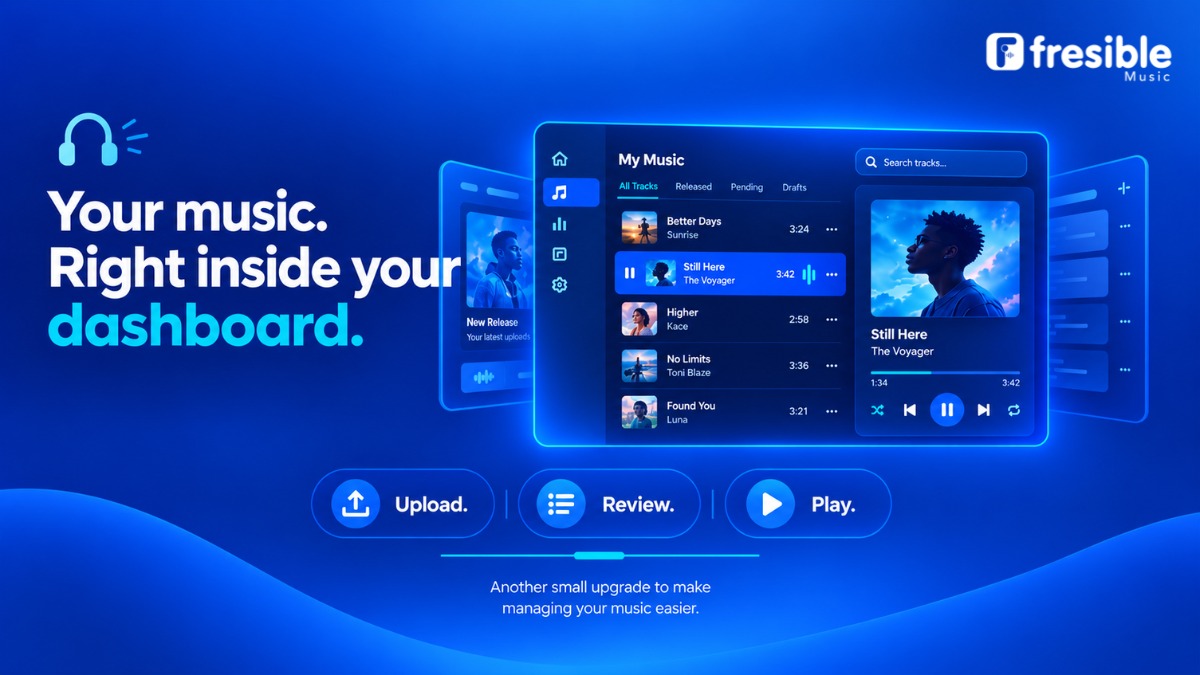
With the new Fresible Music dashboard playback feature, you can now play your tracks directly from your dashboard.
No download required.
What Is Dashboard Playback?
Dashboard playback allows you to listen to your music directly within your Fresible Music dashboard.
Instead of downloading a track before listening to it, you can use the playback option available in your dashboard to play the audio.
This makes it easier to listen to your music while managing your releases.
Why Is This Useful?
1. Listen Without Downloading
You don’t need to download a track simply because you want to listen to it.
Open your dashboard, find the relevant music and play it directly.
2. Quickly Review Your Music
If you manage several releases, you may want to hear a particular track while reviewing your catalogue.
Dashboard playback gives you a convenient way to listen without leaving the dashboard to find the audio elsewhere.
3. Manage Your Catalogue More Easily
Music distribution involves managing more than just the initial upload.
Artists and labels may need to review their releases and keep track of their music over time.
Being able to play tracks from the same place where you manage your music makes that process more convenient.
How to Play Your Music
Using dashboard playback is straightforward:
- Log in to your Fresible Music account.
- Open your dashboard.
- Find the track you want to listen to.
- Select the playback option.
- Listen directly from your dashboard.
You don’t need to download the track simply to listen to it.
The exact location of the playback control may depend on the current dashboard interface.
A Simple Improvement to Your Music Workflow
Sometimes, the most useful platform improvements are the ones that remove small inconveniences.
Previously, if you wanted to listen to a track while managing your music, downloading the file could be an unnecessary extra step.
With dashboard playback, your music is available to listen to directly while you’re working inside Fresible Music.
It’s a small change that can make managing your catalogue more convenient.
When You Might Use Dashboard Playback
There are several situations where this feature can be useful.
Reviewing a recent release
Just uploaded a new song? Play it from your dashboard while reviewing your release information.
Checking older releases
Need to listen to a track you distributed previously? You can play it directly from your dashboard instead of searching for the file on your device.
Managing multiple releases
If you manage several songs or releases, in-dashboard playback gives you a convenient way to listen while working through your catalogue.
Listening before making a decision
Sometimes hearing the actual recording is useful when reviewing music information. Dashboard playback gives you direct access to the audio while managing your releases.
Music Management, Made Simpler
Fresible Music is designed to help artists manage their music distribution from one place.
Features such as dashboard playback are part of making that experience more convenient — from uploading music and managing releases to reviewing the music in your catalogue.
As your catalogue grows, having useful tools available directly within your dashboard can make everyday music management easier.
Frequently Asked Questions
Can I play my music from the Fresible Music dashboard?
Yes. You can now play your tracks directly from the dashboard.
Do I have to download my music before listening?
No. The dashboard playback feature allows you to listen to your music directly without downloading the track.
Can I use dashboard playback to review my releases?
Yes. You can play your music while managing and reviewing your releases from your dashboard.
Is dashboard playback available for Fresible Music users?
The playback feature is available as part of the Fresible Music dashboard experience.
Listen. Review. Manage.
Your music should be easy to access when you’re managing it.
With Fresible Music dashboard playback, you can listen to your tracks directly from your dashboard without downloading them first.
Log in, find your music and press play.